

The photos and notes your HVAC technicians make on every call are proof of honest work, and often only one homeowner ever sees them. Putting them where the next homeowner looks, on your Google Business Profile and your website, turns work your company already did into marketing.
Somebody is deciding who to let into their home. They have never met you. All they have is a star rating, a picture of a van, and your word that your people are careful and honest.
Now picture one of your calls from this morning, a system that wasn't cooling. The tech put on boot covers at the door and laid a drop cloth down the hall. He found a failed capacitor at the outdoor unit. He showed the homeowner the reading on his meter next to the rating printed on the part and replaced it. Then he checked the contactor and the temperature split, told the homeowner both were fine, and said the system did not need replacing.
That visit is the best marketing your company did all day. It showed care for the house, explained the problem in plain words, and told the homeowner what they did not need to buy. One household saw it.
Here is the short version. On one call a day, the tech takes three photos: the covered floor, the bad part, and the finished work. The office hands that call to whoever does your marketing. Once the homeowner says yes, it goes on your Google listing and your website, with nothing that points to the house.
The next homeowner never sees your work
Every company says it's honest. Every company says its techs are clean and respectful. A stranger can't tell which company means it, because the words read the same on every website.
What sets a company apart is showing the work. A photo of the actual part, a reading on a meter, a covered floor. A tech explaining what he found the way he'd tell a neighbor.
Your techs do this every day. Only the homeowner on that call sees it. The person choosing between you and the company down the road never sees it. And they do look you up.
In BrightLocal's 2026 survey of 1,002 U.S. adults, 97 percent said they read reviews for local businesses. After reading positive reviews, the most common next step was visiting the business's website, at 54 percent. Two thirds kept researching before they bought or booked anything (BrightLocal, February 2026). Your site is where they land after the reviews.
"You don't need a new system" is the most believable thing you say
A homeowner with a dead AC expects to be sold a new one. "This is a small part, and the rest of the system checks out." That is the last thing they expect from a company that sells new systems.
A good tech says some version of it every week. Some things need fixing today, some need watching, and some are fine. That last group is the one a stranger believes, and it almost never shows up in a company's marketing.
The plumbing version: a plumber replaces a leaking shutoff valve and tells the homeowner the water heater itself is fine.
Write the capacitor call up in one sentence: "We replaced the capacitor, and the rest of the system tested fine." It does more for the next homeowner than telling them you can be trusted.
One rule: publish the work you did and what checked out fine. Work the homeowner chose to put off stays on the estimate and in the follow-up call. That is private, so don't post it.
What to photograph and note
A write-up covers five things: three photos and two short notes. Your techs already do most of them on every call.
- Protecting the house. Boot covers on, the floor covered, the work area before anything is opened up. It takes one photo and answers the first thing a homeowner worries about.
- The finding. One clear photo of the failed or worn part, in focus, with enough around it to tell what it is. If there's a reading, get the meter in the shot.
- What the tech says. Two sentences in plain words: what it is and why it matters. The way the tech would say it in the hallway, not the way an install manual reads.
- What checked out. The things the tech tested and found fine.
- The finished work. The new part in, the panel back on, the area as clean as the tech found it.
Then ask for an honest review, before the tech leaves or in the follow-up text. A homeowner who got photos and a straight answer has something specific to write about.
A text you can send as is: "Thanks for having us out today. If you're willing to leave an honest review of how we did, here's the link."
Send it to every homeowner, not only the ones you think were happy. Google's review policy does not allow asking only satisfied customers, and a run of reviews that all sound the same reads as staged anyway.
Asking works. In the same BrightLocal survey, 83 percent of consumers who were asked for a review went on to leave one.
Where the photos and notes go
Put them where a new customer looks before calling.
- Your Google Business Profile. This is your listing in Google Search and Maps, with your reviews, hours and photos. Many homeowners see your company here first. Photos of real work and posts built from real calls tell them more than a picture of the fleet. From your profile, use Add photo for the pictures and Add update to post one call with its photo and the tech's two sentences.
- Your website. A short write-up of one real call, with its photos, belongs on the service page for that work. We covered how a finished call becomes a page in How your service calls become the pages homeowners search for. The photos make that page believable.
- Your reviews. You can't write them, and you shouldn't coach them. You can make sure every homeowner has something specific to mention.
- AI assistants. When somebody asks an assistant who to call about a furnace, it answers from what's online. Your own site and your Google profile are the parts you control. And BrightLocal found 45 percent of consumers use AI tools like ChatGPT for local business picks, up from 6 percent a year earlier. More on that in how website chat and AI assistants affect which company gets recommended.
Google asks for real work too. Its guidance on helpful content asks whether a page clearly shows first-hand expertise. It also says trust is the most important quality its systems look for (Google Search Central). Google's Business Profile photo guidelines say an image should represent reality (Google Business Profile Help). A photo of a real part from a real call meets both.
What this looks like on a real company's site
We write these up for one of our clients, an HVAC and plumbing company. Its site carries short write-ups of real calls. No customer names and no addresses.

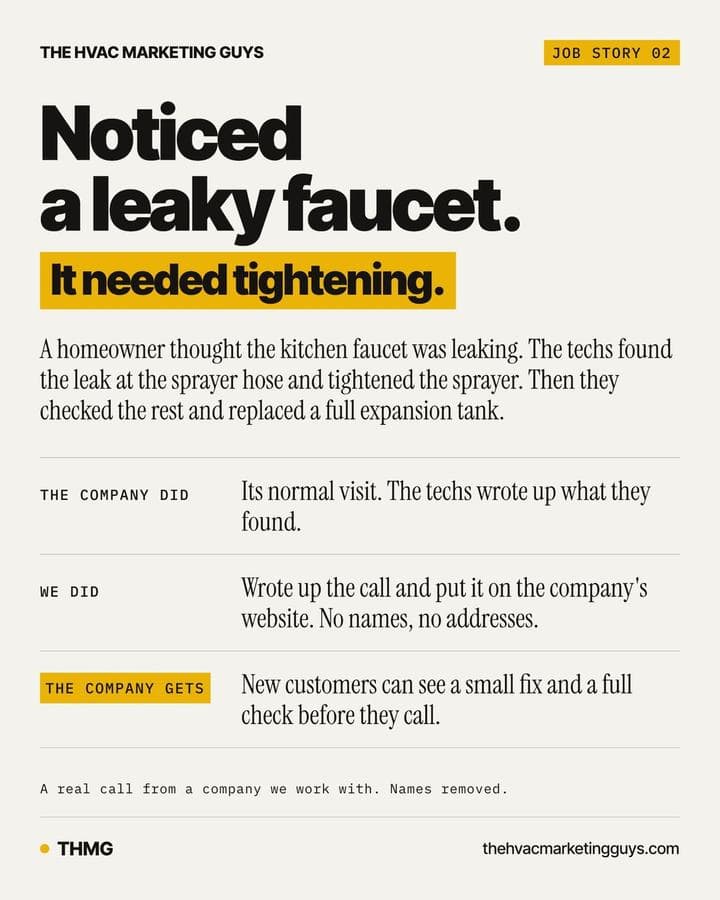
Two calls from one of its recent write-ups:
- The vibration. During a maintenance visit, a homeowner mentioned a loud vibration from the air handler. The tech found a balled-up plastic wrapper stuck in the blower wheel and took it out. He also flushed the condensate drain line, checked the blower motor and housing, and confirmed all 3 zones were working.
- The faucet. A homeowner thought the kitchen faucet was leaking from the middle. The techs took the sprayer off and found the leak at the hose that attaches it, so they tightened the sprayer. Then they checked the rest of the plumbing. The expansion tank on the 10-year-old water heater was waterlogged, so they replaced it.
Both write-ups say what the techs found, what they fixed and what they checked.
The company ran the calls. We turned them into a page the next homeowner can read before they call.
Keep it small so it lasts through busy season
This usually fails for one reason: it's nobody's job. The fix is small on purpose.
- Keep techs out of posting. Nobody in the field posts, edits, or writes captions.
- On one call a day, ask for three photos, not just the bad part. Say it like this: "On one call today, get three photos: the covered floor, the bad part, and the finished work."
- Have dispatch or the office flag one call a day in the job record, the one with the clearest photos and the plainest note.
- Hand the flagged call to whoever handles your marketing. They turn it into a post on your Google profile and a short write-up on your site. You see it before it goes out.
A home is private, so the rules are tighter. Photograph the equipment and the work, not the house. No house numbers, no street, no family photos on the wall, no names, no license plates in the driveway. A tech's name or face goes on it only when that tech is good with it.
Phone photos can also store the location where they were taken. Ask whoever handles your marketing to strip that location data before a photo goes on your website.
Ask the homeowner before anything that shows the inside of their home goes public. The tech can ask before leaving: "Mind if we use a couple of these photos on our website and our Google listing? No name or address goes with them."
What to check on your own setup
- Open the photos on your last ten service calls, in whatever your office uses to dispatch. Count the ones a stranger would understand without the tech there to explain them. If it's fewer than half, start with the three photos above.
- Read the tech notes on those ten calls out loud. If a note is all shorthand and part numbers, ask that tech for two plain sentences next time.
- Search your company name on Google and open the photos on your listing. Count how many show actual work and how many show vans and the building. If the newest work photo is older than this season, add one this week.
- Read your last ten Google reviews. If they all say "great service" and none name what the tech found or explained, text the photo of the finding with your follow-up.
- Ask your techs where their job photos go after the call closes. If the answer is "nowhere," pick one place, the job record or a text to the office, and tell every tech.
How The HVAC Marketing Guys handles this
The HVAC Marketing Guys works with owner-run HVAC companies, on the heating, cooling and plumbing work. For client companies, we draft Google posts, website write-ups and review replies from the company's real service calls, using the techs' photos and notes. The owner approves each draft before anything goes out. We send a review request after every job and keep the company's Google Business Profile current. The write-ups go on the company's own website, which we build so homeowners can find it and request work, and so search engines and AI assistants can read it. More on that work is on our HVAC marketing page.
Frequently asked questions
Do I need the homeowner's permission to use photos from a service call?
Yes, ask first for anything that shows the inside of their home. A close photo of a part or a meter reading shows the work, not the customer. Still, leave out anything that could point back to them: house numbers, names, the street, family photos. Follow your own privacy policy and the rules that apply to you.
My techs don't want to be on camera. Does this still work?
Yes. The part, a pair of hands, and a plain note are enough. Nobody has to talk to a camera. If a tech likes explaining things on video, that's a bonus.
Won't saying "you don't need a new system" cost me replacements?
No. That homeowner didn't need a new system today, so there was no replacement to lose on that call. What you gain is a public example of your company recommending only the repair that was needed.
Our techs don't take photos on calls. Where do we start?
With the phone already in the tech's pocket. One photo of the covered floor, one of the finding, one of the finished work, and two sentences from the tech. Do that on one call a day for a month and you'll have a month of real work to show.
What does The HVAC Marketing Guys do with my techs' photos and notes?
The HVAC Marketing Guys turns photos and notes from a client company's real service calls into Google posts and short write-ups for the company's website. The owner approves every draft before anything goes out. It also sends a review request after every job and keeps the company's Google Business Profile current.
Next step
To see what a stranger sees when they look your company up, start with a free visibility audit.
Sources
- Local Consumer Review Survey 2026, BrightLocal, February 11, 2026
- Creating helpful, reliable, people-first content, Google Search Central
- Manage your Business Profile photos and videos, Google Business Profile Help
Written by Jay Carroll, co-founder of The HVAC Marketing Guys.